Scan the slip
Take a photo of the slip. The app crops it and reads the text. Fix anything wrong before you save.
Scan your RTA taxi shift slip and instantly see your Clean Money: what you really keep after fuel, trip costs and tolls.
Matching your slip by hand at the end of every shift is a chore. The app reads the slip photo, fills the form for you and shows your real take-home (Clean Money) after costs.
Take a photo of the slip. The app crops it and reads the text. Fix anything wrong before you save.
Fuel, trip costs and tolls are taken off your income and the real figure is worked out straight away.
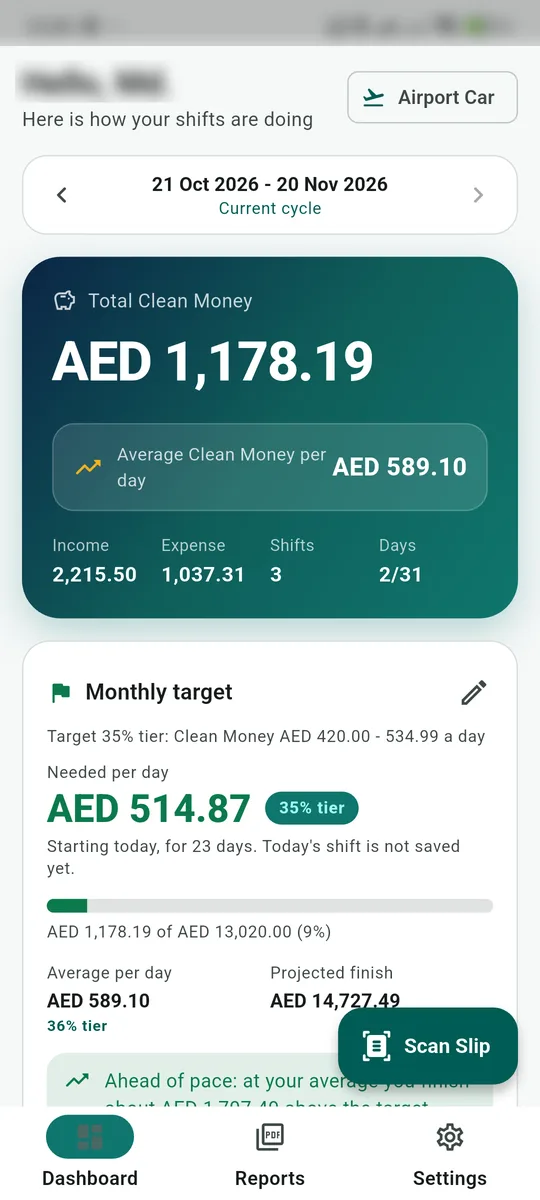
Each day on a single line, with a chart and your average Clean Money per day.
Your month runs from the 21st to the 20th. You can change the start day in Settings.
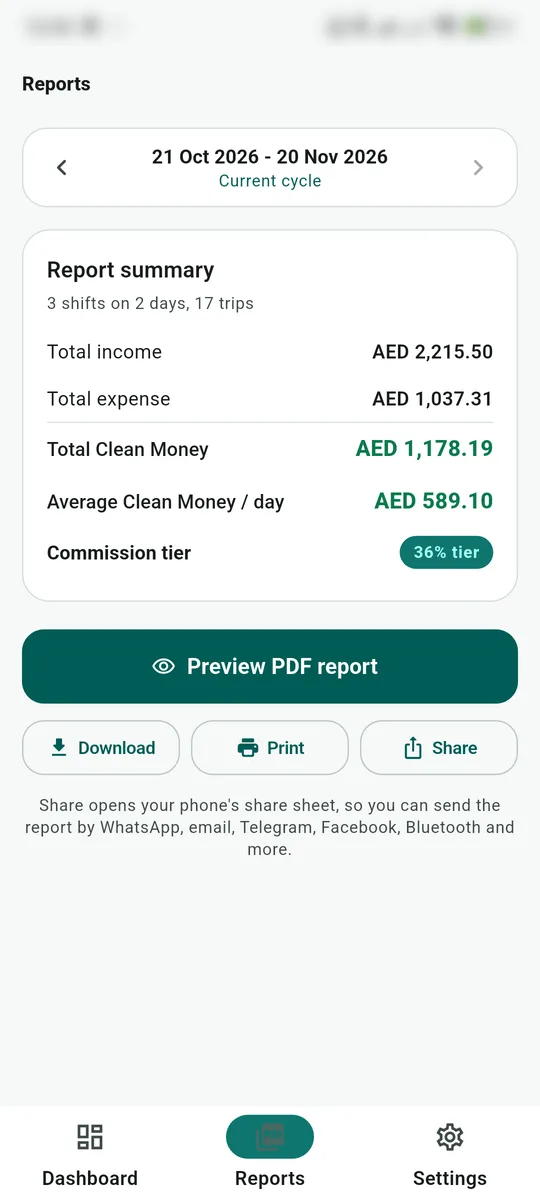
Preview, download or print the report and share it on WhatsApp, email or Bluetooth.
You sign in to use it, and your shift data is kept safely in your own account.
The app is not on the Play Store. You install it straight from the APK file. It takes about 2 minutes, so follow the steps one by one.
Tap the "Download Free (APK)" button above. The file is taxi-slipsnap.apk, about 64 MB. If you downloaded it on a computer, move it to your phone with USB, Google Drive or WhatsApp. You only do this once: when a new version is out, the app asks to update itself, and updates are smaller (about 30-40 MB).
Open your phone's Downloads folder, or the browser's download notice, and tap taxi-slipsnap.apk.
If the phone asks, tap Settings, switch on the toggle next to your browser or file manager, then go back. You only do this the first time.
Tap Install and wait a few seconds. If Play Protect shows a warning, tap "More details" then "Install anyway", because the app comes from outside the Play Store. If the install is still blocked, see the picture guide below.
Tap Open. Later you can start it from the Taxi SlipSnap icon on your home screen.
Create an account with email and password, or sign in with Google. The app cannot be used without signing in.
Because the app comes from outside the Play Store, Play Protect may block the install. Switch it off for a moment in these 5 steps. The pictures below are drawn samples, so your phone's colours or wording may look a little different. Tap where the red circle is.
Open the Play Store app. In the top right corner, tap your round profile picture.
In the menu that opens, tap "Play Protect".
In the top right corner, tap the gear (⚙) icon.
Tap the switch next to "Scan apps with Play Protect". When the green switch turns grey, it is off.
The phone asks you to confirm. Tap "Turn off" and you are done. Now install the APK as in the steps above.
Once Taxi SlipSnap is installed, go through the same steps and switch "Scan apps with Play Protect" back on (green).
Set it up once the first time. After that, scanning the slip at the end of each shift is all you do.
The first time, choose Airport Car, Limousine or Normal Car. Each has its own rates. You can change it later in Settings.
In Settings open Rates and trip types and check the fuel rate (cost per km) and trip types. Add your own columns such as Careem or Uber if you like.
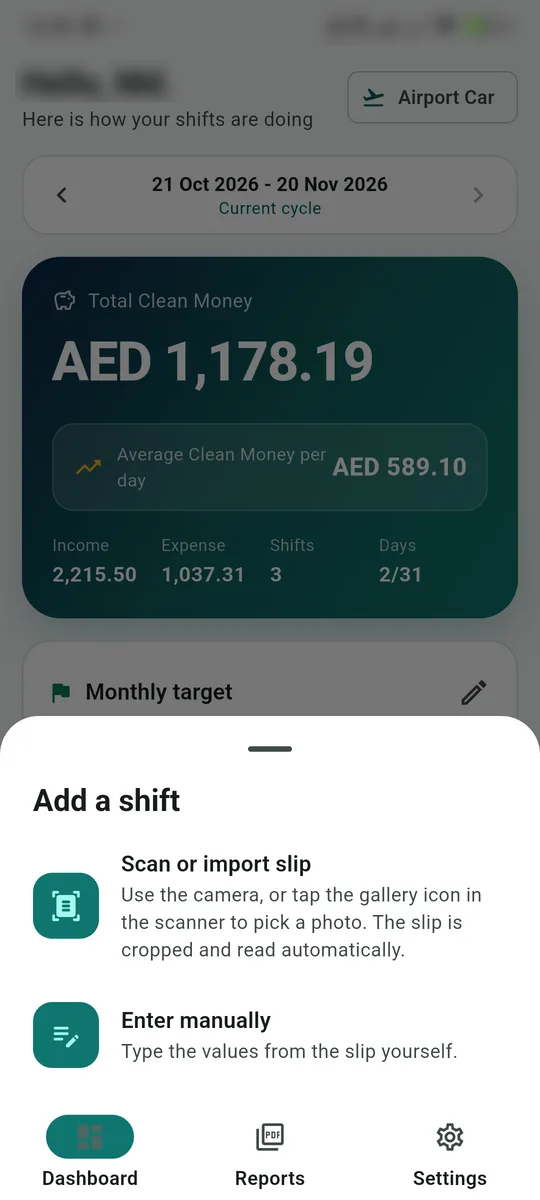
On the dashboard tap the green Scan Slip button, then choose Scan or import slip. Take a photo of the slip with the camera, or tap the gallery icon to pick a photo you already have.
The app crops the slip and fills in the fare, costs and time. If a value looks wrong, correct it, then tap Save. To type everything yourself, choose Enter manually.
The dashboard shows your total Clean Money, your daily average and how far along your monthly target you are. Once a target is set, the app tells you how much to earn each day.
Open the Reports tab at the bottom. Tap Preview PDF report, then Download, Print or Share. Share lets you send it by WhatsApp, email, Telegram or Bluetooth.
Yes. Download it here and use it for free. No license key is needed.
The app comes from outside the Play Store, so Android shows this. Switch on "Install unknown apps" in Settings, and if Play Protect appears tap "More details", then "Install anyway".
It works on any phone running Android 7.0 or newer, including low-cost 32-bit phones (for example Samsung Galaxy A03 Core and Android Go phones).
No. The app does not work offline. You need an internet connection and you must be signed in.
If you do nothing in the app for 1 hour, it signs you out by itself. Just sign in again with your email and password (or Google).
Photograph the slip flat, in good light, with the whole slip in view. If a value is still wrong, fix it in the form before saving, or use Enter manually.
Your data syncs securely to your own account. You can delete the account and all its data from the app's Settings. The details are in the app's Privacy Policy.
Stuck on installing or using it? Message us on WhatsApp and we will help.